Cartoon OC Maker
- 3.1
- Rating
- 100.00K
- Installs
- Free
- Price
 Analysis by App-foxy
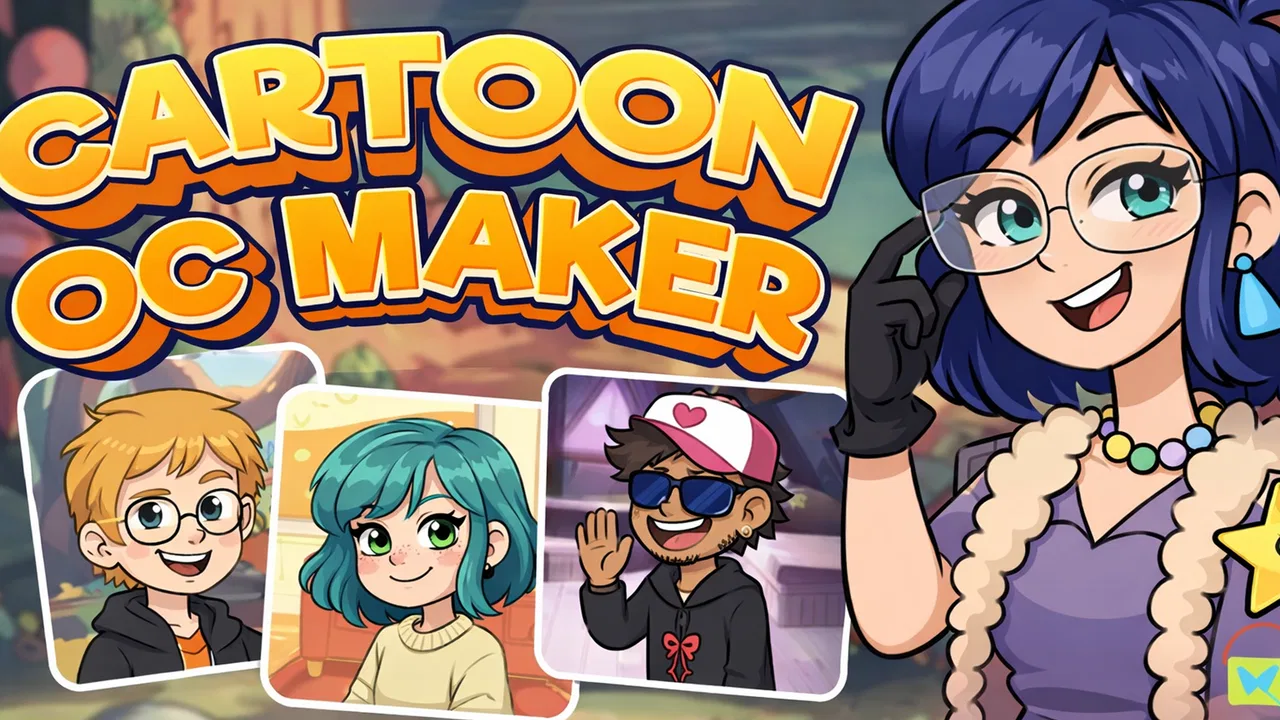
When I tried Cartoon OC Maker, I approached it as a quick character-building tool rather than a full drawing studio. That distinction matters. The app is aimed at making original cartoon characters by combining visual choices such as clothing, poses, and character packs, so the enjoyable part is deciding how those pieces work together. I found it most useful when I wanted a visual starting point for a character idea without opening a complicated illustration program.
It also makes sense as a casual app on a shared household tablet or phone. One person can create a character, show it to someone else, and then hand the device over for another idea. Because the experience is centered on visual customization, it is easy to understand through experimentation. You do not need to know how layers, brushes, or vector tools work before you begin. At the same time, I would not confuse that simplicity with unlimited creative control. This is a focused art and design app, not a replacement for a serious character-design workflow.
How the character-making experience feels in everyday use
The first thing I noticed is that the app encourages quick decisions. Instead of beginning with a blank canvas, I could think about the character’s overall identity and then shape it through available outfits, poses, and packs. That makes it approachable for someone who has a story idea but does not yet know how to draw the person, creature, or avatar in their head.
You May Also Like

 Blood Strike: 2.5 Anniversary
Blood Strike’s Loadouts Turn Every Drop Into a Tactical Gamble
A close look at Blood Strike’s custom loadouts: how fast access to signature weapons reshapes its battle royale rhythm, rewards preparation, and narrows the gap between fights.

 Pandora - Music & Podcasts
Pandora’s Music Is Easy to Start, but Harder to Recover
Pandora’s strength is its low-effort path from a seed to a station. Its weak spot is how much confidence it asks you to place in connection, setup, and quiet recovery.

 8 Ball Pool
 Is Built on Rivalries, Rematches, and Routine
A close look at the rivalries, rematches, shared routines, and unanswered safety questions that turn a quick pool match into a persistent mobile community.

 Samsung Music
’s Quiet Strength Is Playing What You Already Own
Its reach comes less from spectacle than from dependable access to a personal library. That simplicity is both the app’s strongest retention engine and its ceiling.

 AccuWeather: Weather Radar
AccuWeather Review: A Quick, Clear Forecast for Everyday Decisions
For everyday plans, the best forecast is the one you can understand quickly. AccuWeather makes rain timing, radar, and local conditions easy to act on, with a few trade-offs.

 Hill Climb Racing
Why Hill Climb Racing Still Turns Crashes Into One More Run
A tiny car, a bumpy hill and one more upgrade: Hill Climb Racing keeps resurfacing because its simple chaos makes every near-miss feel personal.
More From Our News Desk



A realistic use case is a child or teenager inventing a character for a comic idea, role-playing project, profile image, or short story. They can start with a broad concept such as “a cheerful explorer” or “a mysterious student,” then use the visual options to make that idea feel more specific. I like this because it changes character creation from a demanding drawing task into a sequence of manageable choices.
For adults, the appeal is different. I could see using it to sketch out a cast of characters before writing, to test the look of a mascot, or to make a simple visual reference when discussing an idea with a friend. The result may not have the polish of a professionally illustrated design, but it can answer an important early question: does this character concept feel recognizable and distinct?
The app’s strongest quality is therefore speed. It gives visual form to an idea before the idea loses momentum. That is especially useful on a phone, where opening a full art suite can feel excessive for a five-minute experiment. I would choose this app when I want a character concept now, not when I want to spend an afternoon painting every detail.
What I would do on a shared device
On a family tablet, I would treat the app as a turn-based creative activity. One person could choose the basic character direction, another could suggest an outfit, and a third could decide whether the pose matches the personality. This works well because each choice is visible and easy to discuss. It creates a small collaborative exercise without requiring everyone to understand the same art techniques.
There is a useful social detail here: the app can help separate a character from the person making it. Instead of asking a child to draw themselves perfectly, a parent or sibling can ask questions about the fictional character: what do they wear, how do they stand, and what kind of mood should they show? That can make creative participation less intimidating.
I would still establish a simple household rule before passing the device around: each person gets time to explore, and nobody changes another person’s work without asking. The app is suitable for shared creative use, but the device itself may contain other personal material. I would not assume that a character-making session creates separate user spaces or private profiles. If several people use one phone, coordination outside the app is important.
For that reason, I would save or share a finished character only after checking who is currently using the device and where the result is going. A child may see the activity as harmless, while an adult may want to keep personal images, names, or creative projects separate. The app can support a shared moment, but it does not remove the need for ordinary device boundaries.
Getting started without overcomplicating the process
Cartoon OC Maker is free, which lowers the barrier for trying it casually. Its content rating is Everyone, so it is positioned for broad use rather than a mature audience. I still prefer to sit with younger users during the first session, not because the creative premise is difficult, but because any app used on a shared device deserves a quick look at how the family wants it handled.
The practical setup question is less about technical skill and more about expectations. If you want a polished illustration with precise anatomy, custom brushwork, and detailed editing, you should choose a dedicated drawing app instead. If you want to assemble a cartoon character from guided visual choices, this is a much more comfortable starting point.
I also found it helpful to decide on a character brief before making selections. Writing down three traits—such as calm, inventive, and stubborn—gives the customization a purpose. Otherwise, it is easy to choose attractive pieces that do not belong to the same character. This is one of the app’s less obvious trade-offs: the tool can make a character quickly, but the user still has to provide the design judgment.
For a shared session, I would use a short sequence. First, agree on the character’s role. Next, choose an outfit that supports that role. Then select a pose that communicates the personality. Finally, review the whole combination and remove anything that feels accidental. This approach makes the app more than a random dress-up activity; it turns the available options into a simple design exercise.
The version I reviewed is 1.1.1, and the minimum operating-system requirement is Android 7.0. That makes it accessible to many older Android devices, although the experience can still depend on the particular phone or tablet. A smaller screen may make visual comparison less comfortable when several people are gathered around it. For family use, a tablet is likely easier for discussion simply because everyone can see the character at once.
Coordination matters more than people expect
When several household members use one device, the main challenge is not learning the controls. It is keeping track of whose character is whose. I would recommend giving each project a clear name outside the app, such as a character name plus the creator’s initials. That small habit helps prevent confusion when several similar designs are made in one sitting.
I would also avoid treating the app as a permanent archive unless the family has a separate way to organize finished work. A character can be valuable to a child even if it looks simple to an adult. If the device is shared, agree before deleting, replacing, or moving anything. The safest routine is to review completed work together and decide what should remain available for later.
This is also where the app’s quick format can be both a strength and a weakness. Fast creation encourages experimentation, but it can make people move on before they have recorded why a design works. I like asking the creator to explain one choice: why this outfit, why this pose, or what makes the character different from the previous one. That turns a short session into useful creative practice.
For siblings or friends, coordination can become part of the activity. One person can act as the writer, another as the visual designer, and another as the critic. The roles should rotate so that one confident user does not control every decision. Because the app is simple enough to understand visually, it supports this kind of informal collaboration better than a tool hidden behind complex menus.
However, I would not expect simultaneous editing or separate household workspaces. Nothing about the basic concept suggests that multiple users can work independently inside one shared session. My recommendation is to coordinate manually: take turns, keep personal projects clearly identified, and decide together before sharing a finished result.
Age context, trust, and sensible supervision
The Everyone rating is reassuring for families looking for a broadly accessible creative activity, but an age label should not replace attention from a parent or guardian. Younger children may need help understanding which choices are fictional, which images belong to them, and what it means to share a creation. Older children may want more independence, yet they can still benefit from a conversation about keeping personal details out of character names or descriptions.
I would frame the app as a place to invent, not as a social identity tool. A child can make an avatar-like character without using real information. That is a useful boundary on a shared device, especially if the finished image might later be shown to classmates or posted elsewhere. The app can support imagination, but decisions about public sharing should happen outside the creative session and with an adult’s guidance where appropriate.
Trust also works both ways. Adults should avoid changing a child’s character simply because they prefer a different outfit or pose. The point is to let the creator make choices and explain them. At the same time, children should understand that a shared tablet is not automatically private. Clear household expectations are more realistic than assuming the app itself will manage every boundary.
For a younger user who becomes frustrated by too many choices, I would narrow the task. Ask them to create a character for a specific scene rather than “make anything.” For an older user who wants more control, I would use the app as a planning stage and then move to a drawing or editing tool for the final artwork. That two-step workflow respects both the app’s convenience and its limits.
The app is also a good fit for a family member who enjoys storytelling more than drawing. Someone can describe a character while another person assembles the visual direction. In my experience, this kind of division makes the activity inclusive: artistic confidence is not required to contribute a strong idea.
Where it stands beside ordinary alternatives
The usual alternative is a blank-canvas drawing app. That option gives far more control, but it also asks the user to solve everything from proportions to clothing and posture. For a beginner, the blank page can be less liberating than it sounds. Cartoon OC Maker is better when the goal is to reach a recognizable concept quickly and avoid spending the first session learning a complete art toolkit.
Another alternative is a general avatar or dress-up app. Those apps may be entertaining, but they often encourage users to focus mainly on appearance. Here, the combination of outfits, poses, and character packs is more useful for thinking about a character as a whole. A pose can suggest attitude, while an outfit can support the role in a story. That makes the result more helpful as a reference for writing or planning.
Dedicated character-design software remains the better choice for creators who need exact proportions, reusable assets, detailed expressions, or a consistent model sheet. If you are building a comic with strict visual continuity, you may quickly outgrow a guided customization app. I would use this one for ideation, rough references, and casual creations, then move elsewhere when precision becomes the priority.
There is also a difference between making one attractive character and building a coherent group. The app can help you explore individual designs, but a household project involving a whole cast will require outside organization. I would keep a simple note describing each character’s role, colors, and personality so that later designs do not blur together. That workflow is a practical way to get more value from a lightweight tool.
Small techniques that improve the results
My first tip is to choose the pose earlier than you might expect. Many people begin with clothing because it is visually appealing, but the pose often communicates more about the character’s personality. Once the stance is clear, the outfit can be judged by whether it supports that attitude instead of merely looking good on its own.
My second tip is to make a deliberately imperfect first version. Do not spend too long trying to create the definitive character immediately. Build a quick version, identify what feels wrong, and then make a second pass with one change at a time. This makes comparisons easier and prevents the common problem of changing everything at once without knowing which decision helped.
My third tip is to use the app as a conversation prompt. Ask another person to describe the character before you explain your intention. If they notice the same personality or role you had in mind, the visual choices are doing their job. If they see something completely different, that is not necessarily a failure; it may reveal a more interesting direction for the design.
A fourth useful approach is to create contrasting versions of the same character. Keep the basic idea, then change the outfit or pose to show the character in a different situation. This can help a young writer understand that a character is not defined by one costume. It can also reveal which visual details are essential and which are only decorative.
Finally, I would keep expectations realistic when sharing results. A finished cartoon character may be perfect for a story note, classroom idea, private project, or casual message, but it may not be suitable as final artwork for a book cover or professional brand. The app’s value is in making ideas visible and discussable, not in replacing an illustrator.
Who should use it, and who should move on
I recommend Cartoon OC Maker to beginners, casual creators, families looking for a simple shared activity, and writers who need quick visual references. It is especially appealing if you enjoy character concepts but do not want to begin with drawing fundamentals. The free price makes experimentation easy, and the Everyone rating supports its use as a broadly accessible creative app.
I would be more cautious about recommending it to experienced digital artists. If your normal workflow depends on custom brushes, detailed anatomy, precise layer control, or export-oriented production, the guided format may feel restrictive. You may still enjoy it as a warm-up or idea generator, but it should not be your only design tool.
I would also skip it if your main goal is advanced animation, a complete comic-production pipeline, or a carefully standardized cast. Those tasks need tools built around editing and consistency rather than quick visual assembly. Choosing a simpler app is not always the best choice; the right tool depends on whether speed or control matters more for the project in front of you.
The app has reached over one hundred thousand installs, and its average rating is 3.2 from around 348 ratings, with 33 reviews. I read those figures as a sign of a useful but not universally satisfying niche tool: enough people have tried it to establish interest, while the middling average suggests that expectations may vary. I would judge it by the kind of creation you want to make rather than assuming it will suit every artist.
My household verdict
After using it as a character-creation shortcut, I see the best role for this app clearly. It is a friendly way to turn an idea into a cartoon figure, and it works particularly well when the activity is shared through conversation. A parent can help a child shape a story character, siblings can compare designs, and a writer can create a visual prompt without learning a full illustration system.
The important boundary is that the app provides a starting point, not complete creative ownership of every detail. I would keep personal projects labeled, agree on turn-taking when using one device, and discuss sharing before a finished character leaves the household. Those habits matter because the app itself is simple; it should not be treated as a substitute for family rules about privacy, device access, or creative ownership.
Developed by AthenaHotC, the app is free and was released on May 16, 2025. Its current version is 1.1.1, and it runs on Android 7.0 or later. Those details make it a practical option for trying on an existing Android device rather than buying into a demanding creative setup.
My final recommendation is positive, with a clear condition: use it when you want fast, approachable character ideas, especially in a household or beginner setting. If you need detailed illustration, professional consistency, or deep editing control, choose a dedicated art tool instead. For quick cartoon concepts and shared creative sessions, though, its real strength is making the first step feel easy without pretending to be the last step.
FAQs for Cartoon OC Maker
01What is Cartoon OC Maker, and how does it work?
Cartoon OC Maker is a creative app that allows users to design and customize their own original cartoon characters (OCs). With a wide variety of features, users can choose different hairstyles, outfits, facial expressions, and accessories. The intuitive interface makes it easy for both beginners and experienced designers to bring their unique characters to life.
02Is Cartoon OC Maker free to use, or are there in-app purchases?
Cartoon OC Maker offers a free version that provides access to basic tools and features. However, for a more expansive set of options, such as exclusive outfits and accessories, users can make in-app purchases or subscribe to a premium version. This enhances the creative experience by providing more customization options.
03Can I share my created characters on social media platforms?
Yes, Cartoon OC Maker allows users to easily share their creations on social media platforms. Once you've finished designing your character, you can export the image and post it directly to platforms like Instagram, Facebook, and Twitter. This feature makes it fun and effortless to showcase your creativity to friends and followers.
04Does Cartoon OC Maker require an internet connection to function?
While Cartoon OC Maker can be used offline for creating and editing characters, an internet connection is required for certain features. These include accessing the latest updates, purchasing additional content, and sharing your designs online. Offline mode is perfect for uninterrupted creative sessions without network distractions.
05Is Cartoon OC Maker suitable for children, and does it have parental controls?
Cartoon OC Maker is designed to be family-friendly and suitable for users of all ages, including children. It includes intuitive controls and a safe environment for creativity. While it does not have specific parental controls, parents can supervise in-app purchases to ensure a safe and enjoyable experience for younger users.
Pros
- User-friendly interface for easy navigation.
- Wide variety of customization options.
- High-quality graphics and animations.
- Regular updates with new features.
- Supports multiple save slots for characters.
Cons
- Limited free features; in-app purchases needed.
- Occasional lag on older devices.
- Ads can be intrusive during use.
- Some customization options feel repetitive.
- No offline mode available.

Cartoon OC Maker
Gallery